
Desk Cables in a Rental? Hide Them Without Drilling
Quick fix first: Unplug everything, reroute the shortest cable path behind the desk, and bundle the slack with reusable ties before you buy anything. Then measure your desk edge thickness, the clearance under the desk, and the distance to the outlet. Do not stick adhesive raceways straight onto painted walls, and do not run power cables under a rug to hide them.
Why Desk Cables Get Messy in Rentals
In a small rental, the desk rarely sits where the outlet is. The outlet may be a few feet away, and every device adds a cable: a laptop charger, a monitor cable, a lamp, and a phone charger. Without a plan, cables slide off the desk and trail across the floor.
Renting makes the usual fixes risky: drilling can cost part of your deposit, and strong adhesive can peel paint at move-out. So this guide builds a system, not a single product: clips to guide cables, a tray to carry them, and a box to hide the power strip, all removable when your lease ends.
Verdict: Difficulty: Easy • Time: 10 minutes • Cost: Typically none • DIY or Pro: DIY
Measure Before You Buy
Most cable failures are really measurement failures. A clamp that fits a thin desk will not grip a thick desktop, and a tray that looks compact online may hit your knees. Measure first, and keep the numbers while you shop.
- Desk edge thickness: Measure where a clamp would grip, including any lip underneath. Compare this with the clamp’s stated maximum thickness.
- Clearance under the desk: Measure from the desktop underside to your knees when seated, and note any crossbar or drawer in the way.
- Cable lengths: Measure the route each cable will take, including the drop to the tray and the run to the outlet.
- Outlet position: Note whether the outlet is behind the desk, beside it, or across a walkway. The safest route stays against the wall.
- Power strip size and weight: Measure the strip, count its plugs, and allow room for bulky chargers. A tray or box must hold its weight without sagging.
Verdict: Difficulty: Easy • Time: 5 to 10 minutes • Cost: Typically none • DIY or Pro: DIY
Step 1: Unplug, Untangle, and Shorten the Run
Start with nothing new. Unplug every desk cable, untangle knots, and lay each cable along its route. Moving the power strip closer to the desk often removes surprising slack.
Coil excess length loosely, never tightly around a charger, and secure it with a reusable hook-and-loop tie. Reusable ties can be opened later when you swap a device, unlike zip ties that must be cut off. Keep power and data cables in separate bundles where possible.
Verdict: Difficulty: Easy • Time: 15 to 30 minutes • Cost: Typically low • DIY or Pro: DIY
Step 2: Guide Cables With Removable Clips
Clips solve the most annoying problem: cables that fall behind the desk when you unplug a laptop. Small clips hold a cable along the desk edge or leg, so the end stays within reach.
Choose clips that clamp on, or use gentle adhesive only on the desk itself, not on painted walls. Test one clip in a hidden spot for a day first. Space clips so cables rest naturally: held too tightly, a cable will pop out; with no support, it will sag.
Verdict: Difficulty: Easy • Time: 10 to 20 minutes • Cost: Typically low • DIY or Pro: DIY
Step 3: Mount a No-Drill Cable Tray Under the Desk
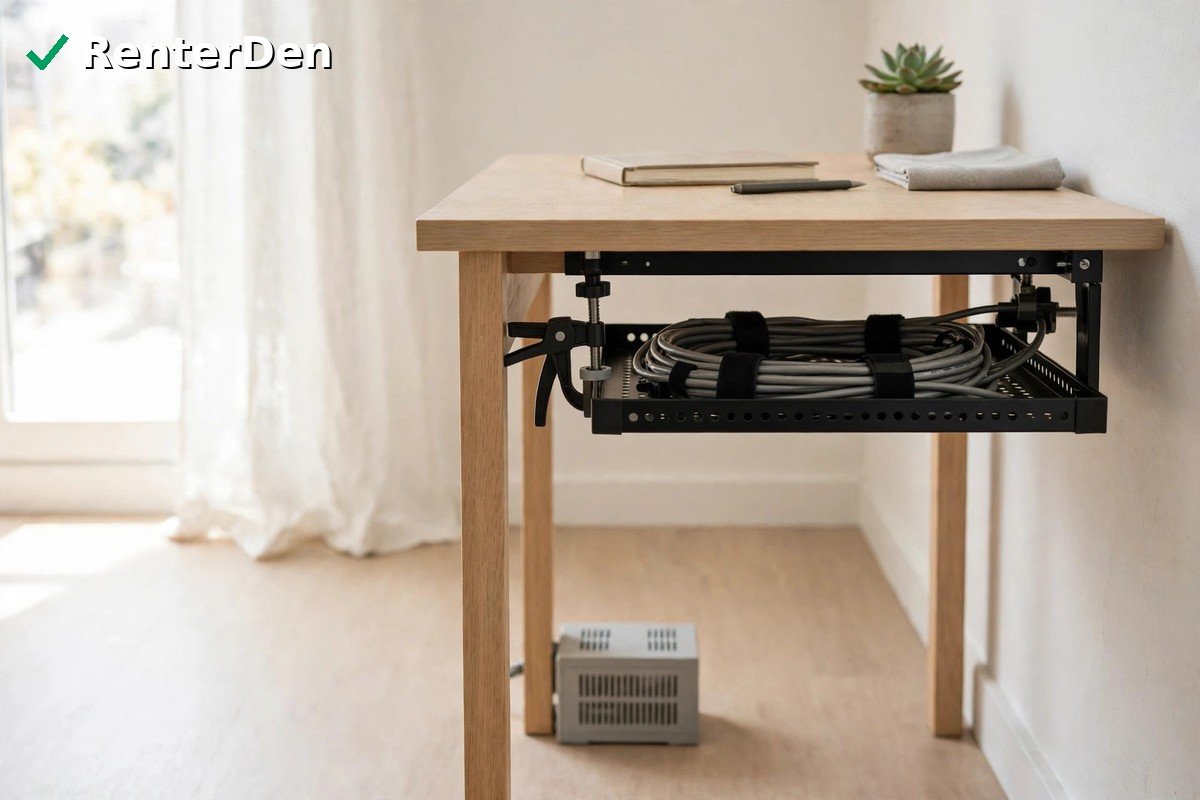
A tray is the backbone of the system: a shallow basket that hangs under the desktop and carries cables horizontally. For renters, look for one that clamps onto the desk edge, not one that must be screwed in.
Check clamp range against desk thickness, and tray depth against the power strip and bundle. Install the tray empty first and check knee clearance while seated. Only then lay cables in, heaviest items nearest the supports, with a little slack at each device end. Do not pack it tightly, and keep it away from heaters. This is general guidance, not electrician advice.
Verdict: Difficulty: Easy to moderate • Time: 20 to 40 minutes • Cost: Typically moderate • DIY or Pro: DIY
Step 4: Hide the Power Strip in a Cable Box
The power strip is usually the bulkiest part of a desk setup. A ventilated cable box hides the strip and plugs while leaving the switch accessible. Never seal a strip inside an airtight container.
Do not overload the strip, and do not plug one strip into another. Check its rating and leave room for bulky chargers. Keep the box where you can reach the switch. If your tray is strong enough, the strip can live there instead. For spare chargers, a simple closet bin keeps them out of the desk zone; see the Closet & Storage ideas.
Verdict: Difficulty: Easy • Time: 10 to 20 minutes • Cost: Typically low to moderate • DIY or Pro: DIY
Step 5: Route the Drop to the Outlet Without Damaging Paint
The last stretch, desk to outlet, is where many setups fail. Never run power cables across a walkway, and never under a rug, where they can overheat, wear unnoticed, and trip people. Route the cable down a desk leg or along the wall edge, using clips on furniture, not adhesive on paint.
If the outlet is beside the desk, a short drop behind the leg is often enough. If it is further away, keep the cable against the baseboard, or move the desk closer. Walk the route and roll the chair over it. The same principles apply to a television; browse the Living Room section.
Verdict: Difficulty: Easy • Time: 10 to 20 minutes • Cost: Typically low • DIY or Pro: DIY
When It Does Not Fit or Fails
Work through the failure before buying stronger adhesive or reaching for a drill.
- Adhesive peels paint: Stop using it on walls. Move the clip to the desk or a leg, test new adhesive in a hidden spot, and photograph lifted paint for move-out.
- Clamp does not fit a thick or thin desk edge: Recheck your thickness measurement, including any lip, and look for a clamp with a wider range, rather than forcing it.
- Tray sags: It is overloaded, the clamps are too far apart, or the strip is too heavy. Move the strip to a floor box and spread the load.
- Cables still fall: Clips are too far apart, or the cable is too short. Add a clip near the drop point and slack at the device end.
- Outlet is in the wrong place: Do not solve this with a long cable across the room. Move the desk if you can, and keep the route against the wall.
Verdict: Difficulty: Easy • Time: 10 to 30 minutes • Cost: Typically none • DIY or Pro: DIY
What About Drilling or Gluing?
Put drilled or glued solutions last, only after trying the removable system above. Drilling is a permanent change that can affect your deposit and lease, and strong glue can damage the surface on removal.
Warning: Do not drill or glue without checking your lease and, where required, getting your landlord’s written permission first. If you get permission, keep the approval and plan the move-out repair. For most renters, a clamp-on tray, clips, and a cable box do the job without that risk.
Verdict: Difficulty: Moderate, plus repair at move-out • Time: Longer than a clamp-on setup • Cost: Typically higher once repair is included • DIY or Pro: DIY only with permission
Frequently Asked Questions
Can I hide desk cables in a rental without drilling? Yes. A clamp-on tray, removable clips, reusable ties, and a ventilated box for the power strip cover most setups without drilling or marking walls.
Will adhesive cable clips damage paint? They can, especially on older or freshly painted walls. Test in a hidden spot first, and prefer clips on the desk or furniture.
What size cable tray do I need? Match the clamp range to your desk thickness, tray depth to your power strip and bundle, and tray length to the run under your desk, with knee clearance checked while seated.
Is it safe to run a power cable under a rug? No. Cables under rugs can overheat, wear unnoticed, and trip people. Route them against the wall or desk leg, keep them off heaters, do not overload outlets or strips, and treat damaged or hot cables as a stop-and-get-advice situation. This is general guidance, not electrician advice.
What should I do first if I can only do one thing today? Unplug, untangle, and bundle the slack with reusable ties, then route the shortest safe path to the outlet. That removes the floor tangle and shows what tray, clips, or box you still need.
For more renter-friendly setups, explore the Workspace section, built around small apartments and deposit-safe choices.
Verdict: Easy • 10 minutes • Free • DIY.